
Как создать страницу подтверждения отписки на нескольких языках
Готовый код и инструкция по настройке
Что такое страница подтверждения отписки
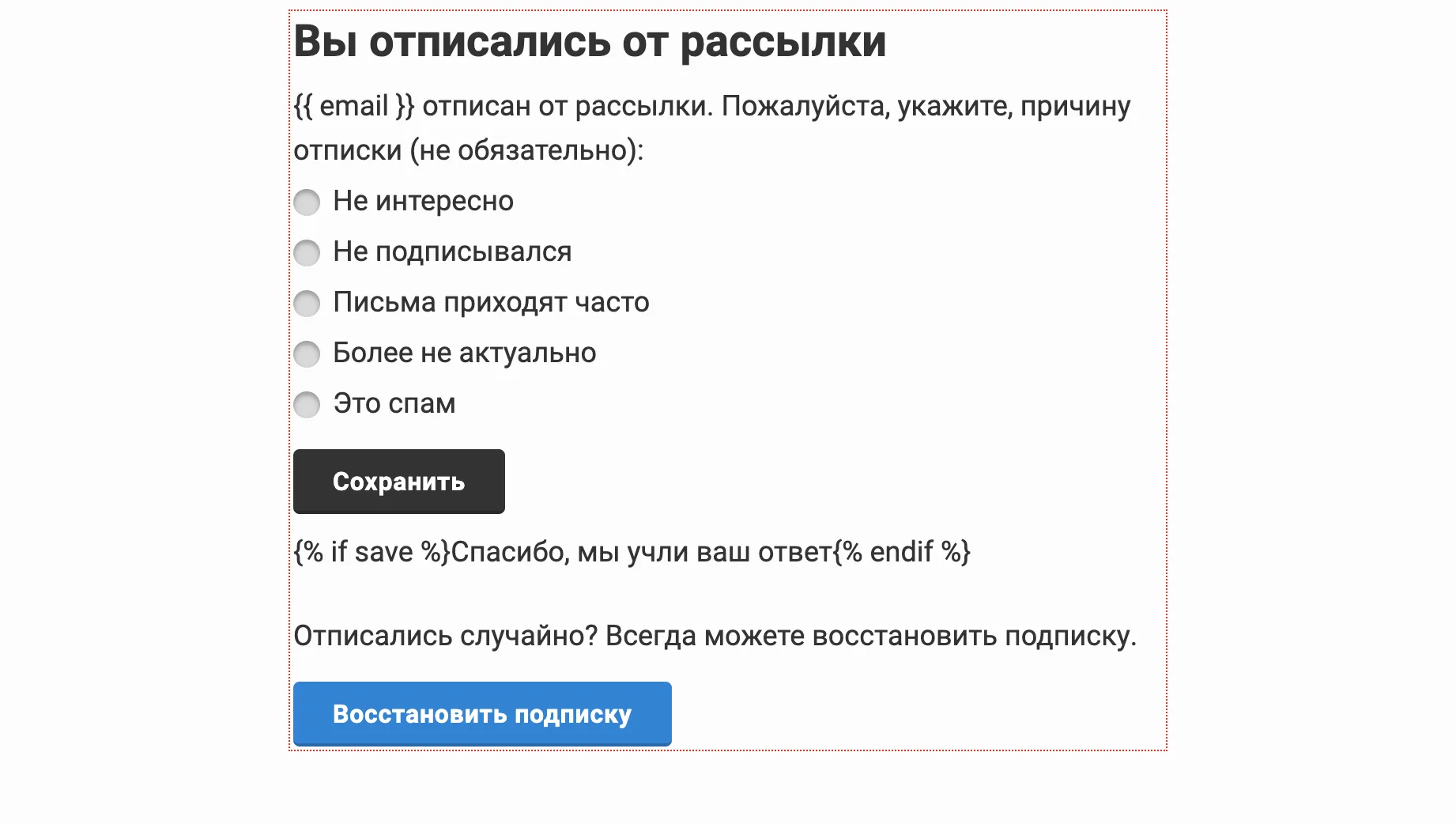
Страница отписки — эта веб-страница, которую подписчик видит после нажатия на ссылку «отписаться» в письме.
Важно! Когда пользователь кликает на кнопку «отписаться» в письме, то он автоматически уже отписывается от получения следующих рассылок.
Отписывать в один клик всегда лучше, чем переспрашивать или заставлять пользователя логиниться — всё это снижает негатив. Если клиент не сможет быстро отписаться, то он может отправить письмо в спам, что приведёт к снижении репутации домена.
На странице подтверждения отписки пользователю предлагается выбрать варианты почему именно он отписался.
Совет: если клиент отписался случайно, то лучше на этой же странице дать ему возможность снова подписаться на рассылку.
Вот как выглядит стандартная страница отписки в Mailganer:
Задизайньте свою собственную страницу
И зачем нужно дать возможность подписаться снова
В блочном и визуальном редакторе Mailganer
Как добавить дополнительный язык на страницу отписки
Шаг 1. В разделе редактирования списка, перейдите на вкладку «Страницы отписки/подписки».
Шаг 2. В редакторе справа нажмите на кнопку «Источник».
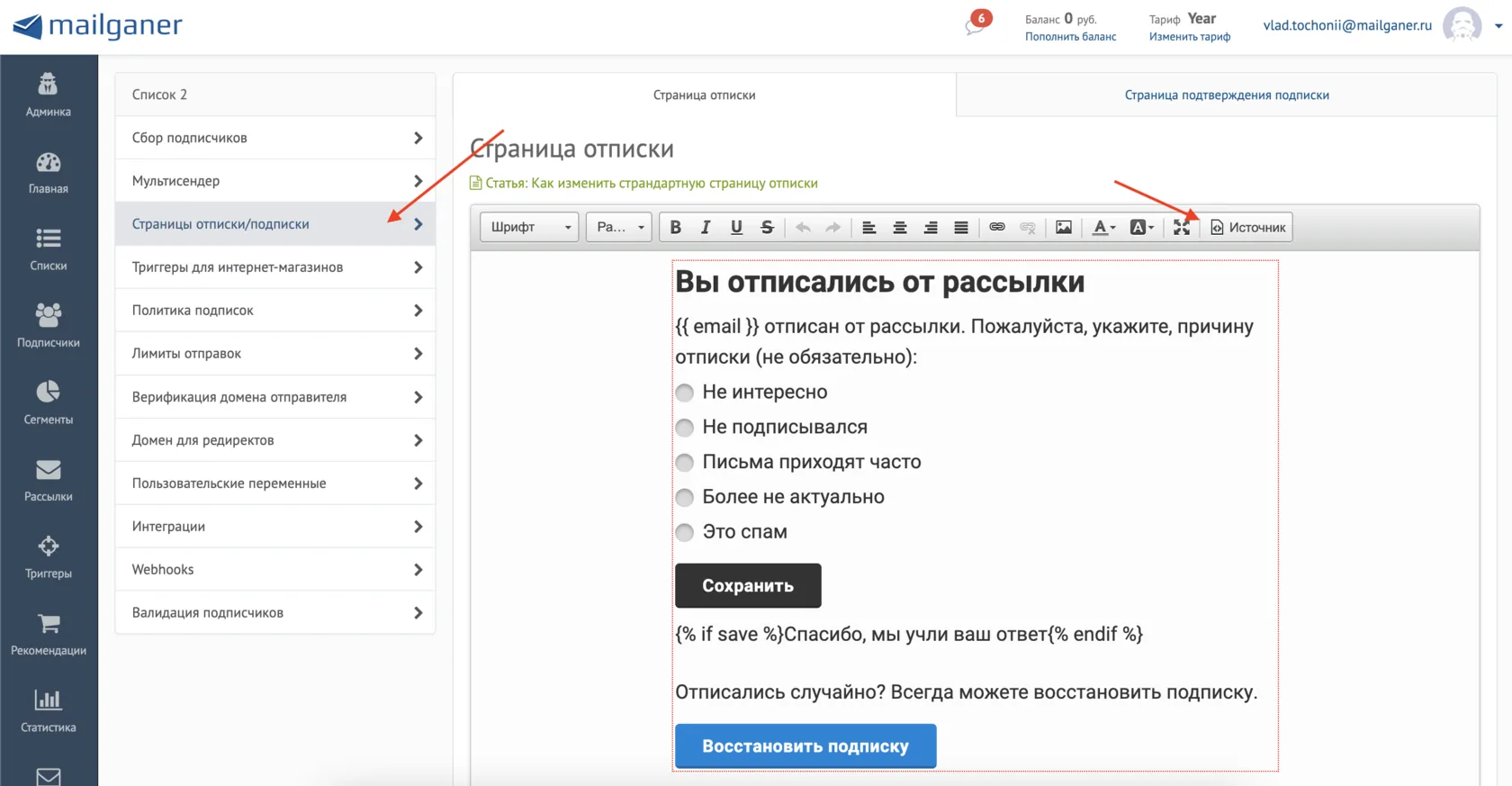
Шаг 3. В открывшемся окне замените весь код на тот, что ниже:
<html>
<head>
	<title></title>
	<style type="text/css">@import url(https://fonts.googleapis.com/css?family=Roboto:300,400,500,600,700&subset=latin,cyrillic);

        html {
            background-color: #fcfcfc;
        }

        form {
            max-width: 550px;
            margin: 0 auto;
        }

        .h1, p, label, .button-link {
            color: #333333;
            font-family: 'Roboto', Arial, sans-serif;
            text-align: left;
        }

        .h1 {
            font-size: 28px;
            font-weight: 700;
            line-height: 34px;
            margin-bottom: 10px;

        }

        p {
            margin: 10px 0 0 0;
        }

        p, label {

            font-size: 18px;
            line-height: 28px;
        }

        .label-wrapper {
            display: block;
            margin-top: 4px;
        }

        .button-link {
            background-color: #333333;
            border: 0;
            border-bottom: 2px solid rgba(0, 0, 0, .2);
            border-radius: 4px;
            color: #fff !important;
            cursor: pointer;
            display: inline-block;
            font-size: 16px;
            font-weight: 600;
            line-height: 17px;
            padding: 12px 25px 10px;
            text-decoration: none;
            text-shadow: none;
            letter-spacing: 0.4px;
            margin-top: 15px;
        }

        .button-wrapper {
            margin-bottom: 25px;
        }

        .button-link:hover {
            background-color: #000000;
        }

        .button-link:focus {
            outline: none;
        }

        a.button-link {
            background-color: #0783d9;
        }

        a.button-link:hover {
            background-color: #0564a8;
        }

        label {
            cursor: pointer;
            position: relative;
            padding-left: 25px;
            margin-right: 15px;
        }

        input[type=radio] {
            display: none;
        }

        label:before {
            content: "";
            display: inline-block;
            width: 17px;
            height: 17px;
            border-radius: 100%;
            position: absolute;
            left: 0;
            bottom: 1px;
            background-color: #d8d8d8;
            box-shadow: inset 0px 2px 3px 0px rgba(0, 0, 0, .3), 0px 1px 0px 0px rgba(255, 255, 255, .8);
        }

        .radio label:before {
            border-radius: 8px;
        }

        input[type=radio]:checked + label:before {
            content: "\2022";
            color: #333333;
            font-size: 41px;
            text-align: center;
            line-height: 20px;
        }
	</style>
</head>
<body>
<form method="post">
{% if lang == 'eng' %}
<div class="h1">You have successfully unsubscribed</div>

<p>{{ email }} was unsubscribed. Please select the unsubscribe reason (optional):</p>

<div class="label-wrapper"><input id="type-1" name="type_unsubscribe" type="radio" value="1" /><label for="type-1">Not interested</label></div>

<div class="label-wrapper"><input id="type-2" name="type_unsubscribe" type="radio" value="2" /><label for="type-2">Have not subscribed</label></div>

<div class="label-wrapper"><input id="type-3" name="type_unsubscribe" type="radio" value="3" /><label for="type-3">Receive emails too often</label></div>

<div class="label-wrapper"><input id="type-4" name="type_unsubscribe" type="radio" value="4" /><label for="type-4">No longer relevant</label></div>

<div class="label-wrapper"><input id="type-5" name="type_unsubscribe" type="radio" value="5" /><label for="type-5">This is spam</label></div>

<div class="button-wrapper"><button class="button-link">Submit</button>

<p>{% if save %}Thank you, we have saved your answer{% endif %}</p>
</div>

<p>If you unsubscribed by mistake you can always restore your subscription.</p>
<a class="button-link" href="{{ confirmUrl }}?lang=eng">Restore subscription</a>
{% else %}
<div class="h1">Вы отписались от рассылки</div>

<p>{{ email }} отписан от рассылки. Пожалуйста, укажите, причину отписки (не обязательно):</p>

<div class="label-wrapper"><input id="type-1" name="type_unsubscribe" type="radio" value="1" /><label for="type-1">Не интересно</label></div>

<div class="label-wrapper"><input id="type-2" name="type_unsubscribe" type="radio" value="2" /><label for="type-2">Не подписывался</label></div>

<div class="label-wrapper"><input id="type-3" name="type_unsubscribe" type="radio" value="3" /><label for="type-3">Письма приходят часто</label></div>

<div class="label-wrapper"><input id="type-4" name="type_unsubscribe" type="radio" value="4" /><label for="type-4">Более не актуально</label></div>

<div class="label-wrapper"><input id="type-5" name="type_unsubscribe" type="radio" value="5" /><label for="type-5">Это спам</label></div>

<div class="button-wrapper"><button class="button-link">Сохранить</button>

<p>{% if save %}Спасибо, мы учли ваш ответ{% endif %}</p>
</div>

<p>Отписались случайно? Всегда можете восстановить подписку.</p>
<a class="button-link" href="{{ confirmUrl }}">Восстановить подписку</a>
{% endif %}
</form>
</body>
</html>
Код для страницы повторной подписки:
<html>
<head>
	<title></title>
	<style type="text/css">@import url(https://fonts.googleapis.com/css?family=Roboto:300,400,500,600,700&subset=latin,cyrillic);

        html {
            background-color: #fcfcfc;
        }

        form {
            max-width: 550px;
            margin: 0 auto;
        }

        .h1, p, label, .button-link {
            color: #333333;
            font-family: 'Roboto', Arial, sans-serif;
            text-align: left;
        }

        .h1 {
            font-size: 28px;
            font-weight: 700;
            line-height: 34px;
            margin-bottom: 10px;

        }

        p {
            margin: 10px 0 0 0;
        }

        p, label {

            font-size: 18px;
            line-height: 28px;
        }

        .label-wrapper {
            display: block;
            margin-top: 4px;
        }

        .button-link {
            background-color: #333333;
            border: 0;
            border-bottom: 2px solid rgba(0, 0, 0, .2);
            border-radius: 4px;
            color: #fff !important;
            cursor: pointer;
            display: inline-block;
            font-size: 16px;
            font-weight: 600;
            line-height: 17px;
            padding: 12px 25px 10px;
            text-decoration: none;
            text-shadow: none;
            letter-spacing: 0.4px;
            margin-top: 15px;
        }

        .button-wrapper {
            margin-bottom: 25px;
        }

        .button-link:hover {
            background-color: #000000;
        }

        .button-link:focus {
            outline: none;
        }

        a.button-link {
            background-color: #0783d9;
        }

        a.button-link:hover {
            background-color: #0564a8;
        }

        label {
            cursor: pointer;
            position: relative;
            padding-left: 25px;
            margin-right: 15px;
        }

        input[type=radio] {
            display: none;
        }

        label:before {
            content: "";
            display: inline-block;
            width: 17px;
            height: 17px;
            border-radius: 100%;
            position: absolute;
            left: 0;
            bottom: 1px;
            background-color: #d8d8d8;
            box-shadow: inset 0px 2px 3px 0px rgba(0, 0, 0, .3), 0px 1px 0px 0px rgba(255, 255, 255, .8);
        }

        .radio label:before {
            border-radius: 8px;
        }

        input[type=radio]:checked + label:before {
            content: "\2022";
            color: #333333;
            font-size: 41px;
            text-align: center;
            line-height: 20px;
        }
	</style>
</head>
<body>
<form method="post">
{% if lang == 'eng' %}
<div class="h1">Subscription confirmed</div>

<p>{{ email }} was subscribed</p>
<a class="button-link" href="https://example.com">Go to site</a>
{% else %}
<div class="h1">Подписка подтверждена</div>

<p>{{ email }} подписан на рассылку от Example</p>
<a class="button-link" href="https://example.com">Перейти на сайт</a>
{% endif %}
</form>
</body>
</html>
Переводы правятся внутри {% if lang == 'eng' %} и {% else %}. Значение в ссылке должно совпадать буква в букву: {{unsubscribeUrl}}?lang=eng.
! В триггерных письмах ?lang= пока не работает !
Как подписчику показать ссылку отписки на английском языке
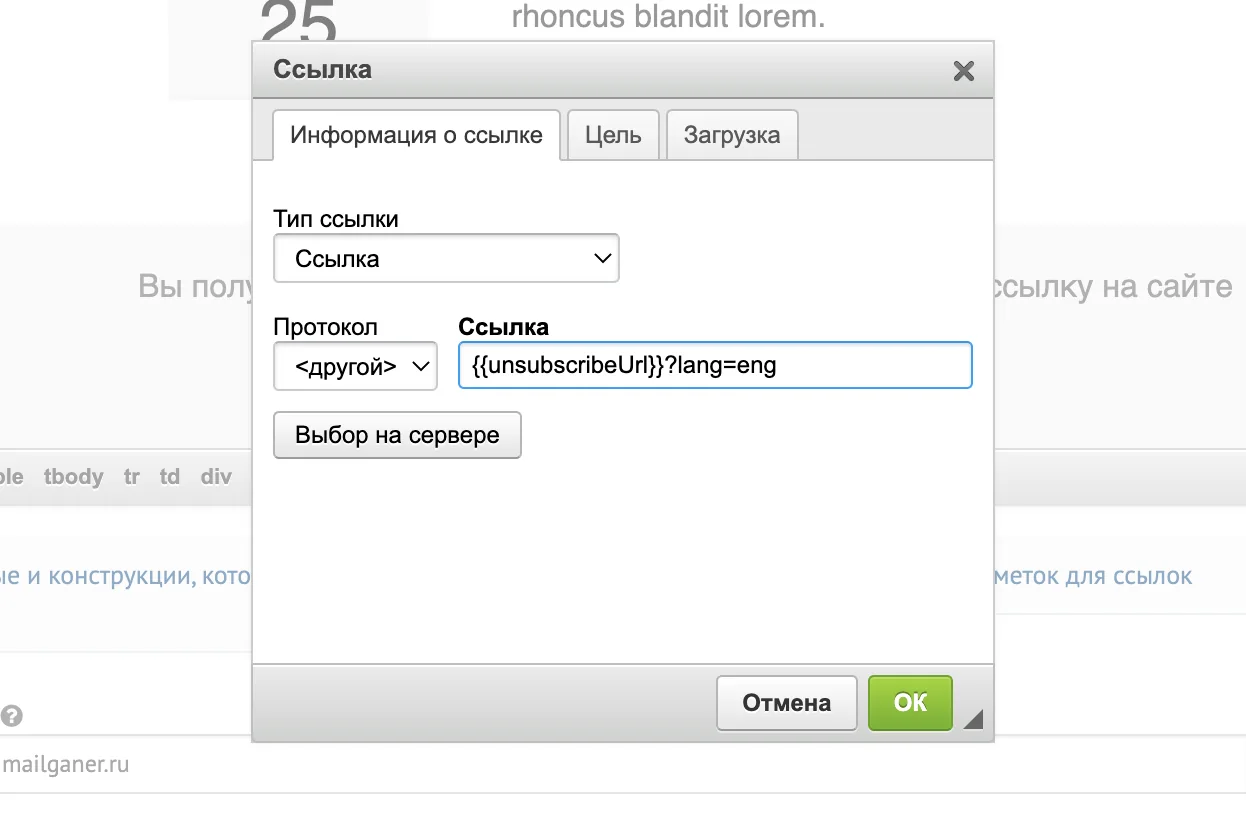
Теперь, чтобы подписчики видели ссылку подписки на нужном языке, вам нужно к конструкции {{unsubscribeUrl}} добавить этот же параметр ?lang=eng, чтобы получилось так:
{{unsubscribeUrl}}?lang=eng
Именно так нужно вставлять макрос ссылки отписки в письмо для тех подписчиков, которым нужно отобразить страницу на английском.
Понятно пишет о сложных вещах в разъяснительной Mailganer. Работает с лендингами и подсказками внутри продукта. Делает рассылки компании и отвечает за новости в Телеграм-канале.
Стать автором блога Mailganer ›
